Tuesday, April 2, 2019

3ds Max 2020 Chamfer Updates

Origin link

Our latest Chamfer Modifier updates in 3ds Max 2020 make it more efficient and predictable for modeling.
Watch as 3ds Max team member Martin Coven takes you through the details:

 Highlights
  • The new Fixed Weight Chamfer keeps a consistent chamfer width. 
  • Weighted chamfer allow chamfer to be controlled on a per-edge basis with crease weights. 
  • New presets allow to save favorite or set default settings. 
  • Added Inset adds edge rings to chamfers for users who cannot use smoothing
  • groups, such as models for game engines. 
  • End Point Bias: Edges that don’t end at a corner terminate on the next parallel edge can 
       bias between the near and far vertex.
  • Added Depth allows the profile of the chamfer to go from a depth of 1 (a sharp edge)    to 0 (a straight edge), to -0.5 (an inverted curve) 


 Bringing your ideas to life
Autodesk is committed to responding quickly to 3ds Max user feedback. That’s why this release includes many of which were submitted by the 3ds Max user community at 3dsmaxfeedback.autodesk.com.

Consult the 3ds Max 2020 Release Notes for further information.
For more details, see  What’s New in 3ds Max and visit the 3ds Max Public Roadmap.

Featured free Marketplace content - April 2019

Origin link
By Amanda Bott

In partnership with Unreal Engine Marketplace creators, select content will be available for free to the UE4 community each month to give artists, designers, and programmers even more resources at no additional cost.

Check out the new content available this month!

April's Featured Free Content:

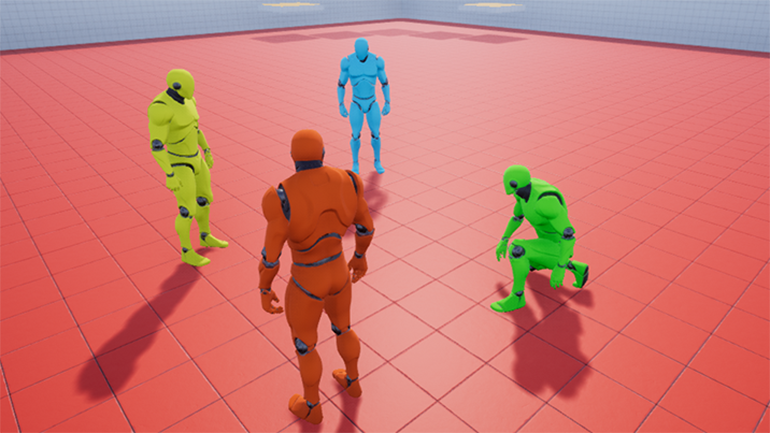
Advanced Locomotion System V3 - LongmireLocomotion

1_AdvancedLocomotion_770.png
An advanced character BP locomotion system, with over 70 animations and blendspaces

Crazy Insane Dining Sets - Tiny Little Studios

2_CrazyDiningSets.png
Over 65 dining sets and small props to decorate your interior scenes

DENT - Networked Destruction - ByteSumPi LTD

3_Dent_770.png
A fully networkable toolkit that extends the amount of control and refinement over fractures

Mega Game Music Collection - MuzStation Game Music

4_MegaMusicCollection_770.jpg
A library of over 180 music tracks for action, fantasy, horror, puzzle games, and more

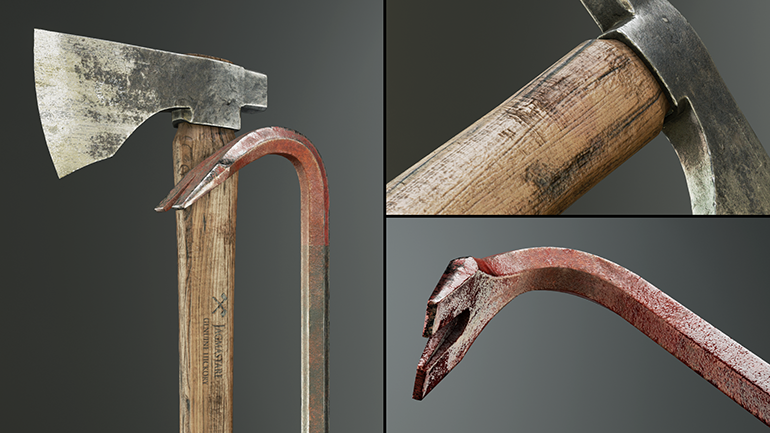
Melee Weapons Pack - Karl Detroit

5_Weapons_770.png
8 high-quality melee weapons with LOD, PBR textures and materials

New Permanently Free Content:

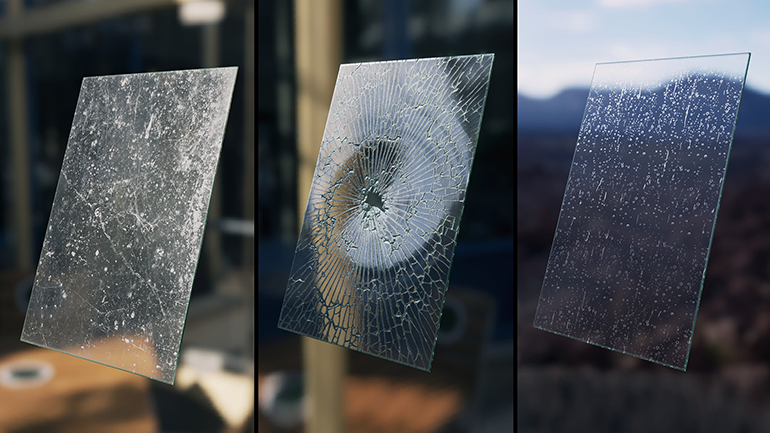
Advanced Glass Material Pack - Michal Orzelek

6_AdvancedGlassMaterialPack_770.png
A collection of high quality, customizable glass, and transparent materials

City Subway Train - Modular - Dekogon

7_CitySubwayTrain_770.png
Modular New York-style underground subway train, including models, materials, and VFX

Grab these great assets from Marketplace creators while they’re available! New content will arrive in May, so check back then for even more new free content.

Are you a Marketplace creator interested in having your content featured for free to the community? Visit unrealengine.com/uesponsoredcontent.

Monday, April 1, 2019

Autodesk 3ds Max 2020

Origin link

Autodesk is going to release 3ds Max 2020 which is focuses on delivering efficiency, performance, and stability that will speed up the content creation process. New updates for Revit and Chamfer Modifier provide more flexibility whether it’s dealing with importing complex BIM data or creating that next killer game asset. Improvements to OSL (Open Shading Language), viewport playback, and a faster animation preview allow to visualize the result of the work more accurately and minimize times between production changes. 
Check out the new features Video


Highlights features should be:

- Chamfer modifier improvements 
- Enhancements and Changes for Alembic, Civil View, Modeling, Performance

What was new in 2019.3 Update

*Interactive ActiveShade viewport 
- Improvements to ActiveShade let you interact and render simultaneously in the same viewport. Your rendering workflow is extended so you can now see the final result of your adjustments as you make them.

*Revit version compatibility 
- You no longer need to upgrade your file when importing a Revit 2018 file, provided you have 3ds Max 2018 and Revit Interoperability for 3ds Max installed.

*Alembic interoperability with Maya 
- Custom Attributes from Maya are grouped to support attributes on transforms and shapes, and vertex color sets are compatible with Maya import and export.

*OSL Map 
-Improvements include improved bracket highlighting, syntax highlighting, and better docking. Viewport support supports OSL features such as node properties and improved Bump map support.

*Revit import
-Importing Revit is twice as fast as before (depending on the dataset), lights imported from Revit (via FBX/RVT) now work and render correctly, and the Import dialog has been improved so it is easier to understand and use. 

there are no much change but no worry we have something really cool coming to 3ds Max: tyFlow.


Saturday, March 30, 2019

Homebound Case Study

Original article here!

CRYENGINE was a proud sponsor of Global Game Jam 2019 and today we have released an in-depth video case study about Homebound, one of our entries. Find out how the team used CRYENGINE to create the game in just 48 hours and get practical tips on how you can use the same techniques.


Homebound is a game where you have to make your way home after a night working in a bar. You can download the Homeboundproject from the CRYENGINE Marketplace so you can investigate the game in the engine. In our in-depth new video, Learning Manager Brian Dilg demonstrates a series of techniques used to create the project, with additional commentary from some of the members of the team that made the game. Jean-Baptiste HervĂ©, Junior Software Engineer for CRYENGINE, Viktor Ikkes, Senior Cinematic Designer for Hunt, Alexander Klinger, Software Engineer for CRYENGINE, and Matthias Otto, Senior Level Designer for Hunt, all give insights about how they made the game so quickly as Brian demonstrates a range of techniques that you can use.
Topics covered include:
  • Custom C++ programming
  • Level design
  • Flow Graph level scripting
  • And plenty more!
This video is a substantial case study packed with useful examples and tutorials, so whether you’re new to CRYENGINE or looking for practical ways to accelerate your work with the engine, we hope you’ll find this video useful.

We look forward to your feedback in the comments, on the forum, or via Facebook, and Twitter. Don’t forget to join the community and our CRYENGINE development team over on the official CRYENGINE Discord channel.
- Your CRYENGINE Team

Thursday, December 17, 2015

3ds max shortcut keys

http://www.architectdose.tk/2015/12/3d-tutorials-3dsmax-shortcut-keys.html

3D Tutorials - 3dsMax Shortcut Keys

3D Tutorials - 3dsMax Shortcut Keys

3D Tutorials - 3dsMax Shortcut Keys

3D Tutorials - 3dsMax Shortcut Keys

3D Tutorials - 3dsMax Shortcut Keys

3D Tutorials - 3dsMax Shortcut Keys